
CAT5e UTP Cable
90
configurations
Browse by type

Unshielded CAT5e Black Ethernet Patch Cable - Molded Boot/ Snagless RJ45 to RJ45
38 configs
Shop →

Unshielded CAT5e Blue Ethernet Patch Cable - Molded Boot/ Snagless RJ45 to RJ45
31 configs
Shop →

Unshielded CAT5e Gray Ethernet Patch Cable - Molded Boot/ Snagless RJ45 to RJ45
21 configs
Shop →

Unshielded CAT5e Green Ethernet Patch Cable - Molded Boot /Snagless RJ45 to RJ45
13 configs
Shop →

Unshielded CAT5e Red Ethernet Patch Cable - Molded Boot/ Snagless RJ45 to RJ45
31 configs
Shop →

Unshielded Cat5e Yellow Ethernet Patch Cable - Molded Boot/Snagless RJ45 to RJ45
19 configs
Shop →
Not sure which cord you need?
Answer a few quick questions and we’ll narrow it down for you.


About CAT5e UTP Cable
Unshielded Cat5e Gray(Enhanced Category 5) network cables are an upgraded version of the Cat5 cable that was made to support 1000Mpbs Gigabit ethernet speeds. Cat5e allows you to get 1 Gbps speeds operating at a frequency of up to 100 MHz, due to the reduction of crosstalk and other improvements over the Cat5 standard. Cat5e supports speeds of 10BASE-T, 100BASE-T, and 1000BASE-T, allowing it to be backward compatible with older IT equipment. Cat5e features the standard RJ45 connector on both sides of the cable, which is the standard connector used in almost all consumer IT products. The maximum length for Cat5e at 1 Gbps speeds is 100M. Standard stock lengths are 1FT - 100FT. Gray cables blend in well in office spaces to help maintain a clean appearance. Use cable wire ties to wire ties to bundle multiple cables together to keep them organized.
Cat5e cables are typically used to connect
- Router to a Switch
- Switch to a computer
- PoE Switch to an IP Camera
- XBox/PS4/Video Game Console to a Switch/Router
- Laptop/Computer to an RJ45 wall outlet (such as in an office, hotel, etc.
General Information
Cat5E Patch cords are the primary patch cord used in the market today for connecting low bandwidth devices such as Consumer Grade Routers, Switches, Desktop Computers, Laptops, and Game Consoles like XBox, PlayStation, and Wii. A "patch" cable is simply a short length cable that has pre-terminated ends. Patch cables are used when you have a short distance to connect between two devices and when you don't need a permanent solution such as running cable through a building. Below is an example of a Cat5e UPT (Unshielded Twisted Pair) patch cable connecting a Netgear Nighthawk Router to a Lenovo Desktop Computer.
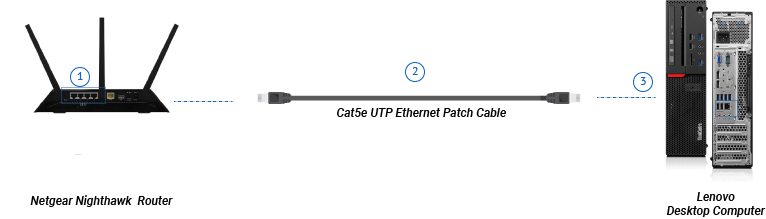
| 1 | Netgear Nighthawk Router | The netgear nighthawk router incorporates a small 4 port switch which you can use to connect the router to other devices. Consumer grade switches like the Nighthawk use RJ45 ports which will mate with a Cat5e, Cat6, and Cat6a cable. |
| 2 | Cat5e UTP Ethernet Patch Cable | This patch cable is used to connect the router to the computer. It features RJ45 plugs on each end which mate with the switch and the laptop ethernet ports. |
| 3 | Lenovo Desktop Computer | The Lenovo featured in the diagram can be swapped out for any computer or device which has an ethernet card such as a laptop, gaming console, etc. |
Typical Applications for Cat5e UTP Cables
With the addition of Cat6, Cat6a, and Cat7 cables, it can be difficult to know which type of ethernet cable is right for you. To start answering this question, it is best to look at what you kind of network you are installing it on, and what devices it will be connecting.
Home Networks
For home networks, Cat5e is typically considered more than sufficient to handle consumer bandwidth. Most consumer internet connections are between 10 Mbps and 100 Mbps download speeds, while Cat5e cables are rated at up to 1000 Mpbs. This means that by just surfing the internet, the speed of your network would be bottlenecked by your ISP (internet service provider), and not by the physical capability of your cabling. Typical applications for Cat5e in a home are connecting a router to a switch, a switch to a computer or printer, or a router to a wireless access point. Cat6 or Cat6a may be recommended if you are running cable longer than 100M in your home.
Small Business Networks
Small business networks have more complex requirements than home networks. For installing or updating the network cabling throughout a building, Cat6 cable is recommended to future proof the installation, especially if the company utilizes large amounts of Network Attached Storage (NAS) and many employees are accessing large files over the network at a time. Cat5e can still be used to connect an end user computing device such as a laptop or desktop to a Cat5e wall outlet or network switch. Cat6a cables may be recommended if the company is streaming large amounts of data or frequently accessing large data files such as 4K videos and the cabling exceeds ~50M.
FAQ About Cat5E Cables
Will a better ethernet cable make my internet faster?
No, upgrading to Cat6 or Cat6a will not make your internet any faster. Typical internet download speeds range from between 10mbps to 100 mbps while a Cat5e cable is rated for 1Gbps (1000 mbps). This means that the bottleneck is not your ethernet cable, it is your internet speed.
Is using an ethernet cable faster than using WiFi?
Typically yes. Unless you are directly next to your WiFi access point (typically a "router" for consumer networks), using a wired ethernet connection with a Cat5e cable will make you network speed significantly faster. These effects will be especially noticeable if you stream movies from one device to another such as a Macbook to an Apple TV, or a Chromebook to a Chromecast.
Certifications & compliance
- UL
- cUL
- RoHS
- REACH
- Every cord we build is hi-pot tested
- Same-day shipping by 2:30 PM ET
- NET 30/60/90 for approved accounts
- In-house engineering and compliance support
Frequently asked questions
- What certifications do these power cords carry?
- UL and cUL-listed cord sets across the catalog, with 30+ international approval marks (VDE, ENEC, PSE, SAA, CCC, KC and more) on country-specific cords. The approvals each part carries are listed on its product page; documentation is available from sales.
- Do you require a minimum order quantity?
- No. We sell from 1 cord to 100,000. Volume discounts apply automatically at quantity breaks — you'll see pricing tiers on every product page.
- Can I get a custom length or color?
- Yes. Custom lengths and non-standard colors are hand-terminated in our Connecticut shop — typically 3–4 business days from in-stock components. Call (860) 763-2100 or submit a quote request with your specs.
- How fast does this ship?
- In-stock orders placed by 2:30 PM ET ship the same day via FedEx or UPS. All standard configurations are stocked in East Windsor, CT.